01Standard-Lambda hat eine Heimat

Und die ist oft einen Kontinent weit weg.

Eine klassische Lambda-Funktion läuft in genau einer Region. Sagen wir eu-central-2 in Zürich. Wenn ein User aus Sydney zugreift, reist die Request einmal quer über den Pazifik, die Funktion antwortet, die Antwort reist zurück. 200 bis 400 Millisekunden extra, bevor dein Code überhaupt anfängt.

Für viele Anwendungen ist das fein. Für Auth-Checks, Security-Header oder Routing-Entscheidungen, die bei jeder Request passieren, ist es Verschwendung.

02Lambda@Edge dreht das um

Dein Code läuft dort, wo der User ist.

Lambda@Edge deployed deine Funktion auf über 400 CloudFront-Edge-Standorte weltweit. AWS repliziert den Code global, CloudFront führt ihn am Standort aus, der dem User am nächsten ist. 10 bis 50 Millisekunden statt 200 bis 400, egal wo die Request herkommt.

Du schreibst die Funktion wie eine normale Lambda (JavaScript oder Python). Der einzige Unterschied ist, wo sie läuft und wann sie getriggert wird.

03Die vier Trigger-Punkte

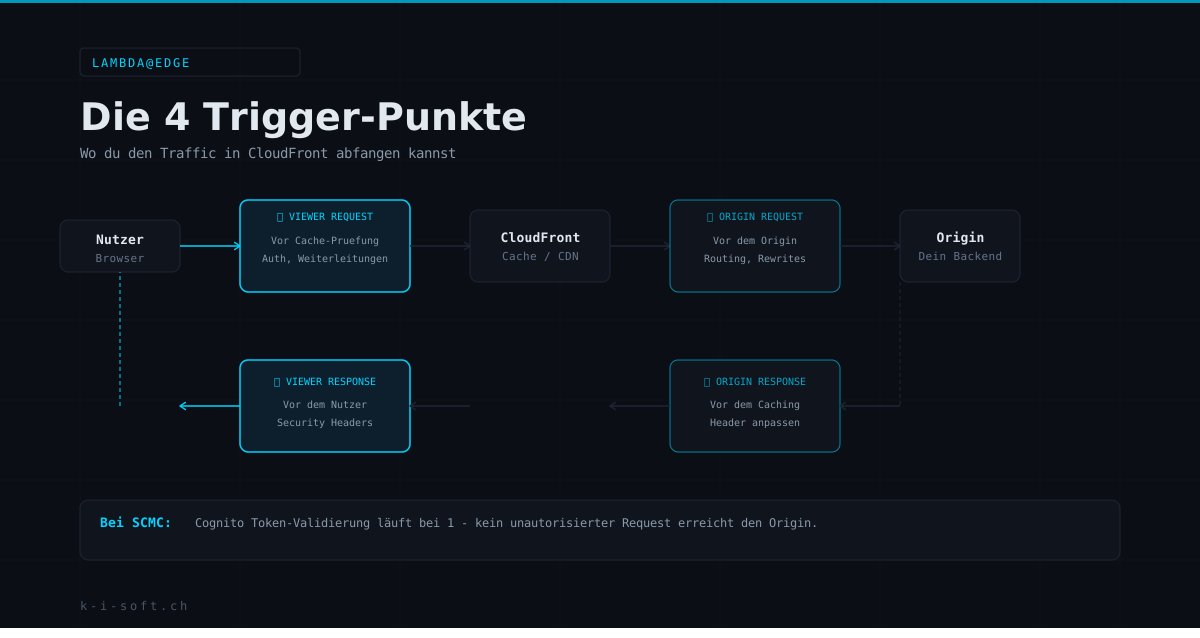
Vier Momente im CloudFront-Request-Lifecycle, an denen du eingreifen kannst.

  • Viewer Request Läuft bevor CloudFront den Cache prüft. Perfekt für Auth-Checks, Redirects, URL-Rewrites, Bot-Detection. Wenn du hier eine Request ablehnst, sieht dein Backend sie nie.
  • Origin Request Läuft bevor die Request die Origin trifft (aber nur bei Cache-Miss). Gut für Header-Manipulation, die nicht im Cache-Key landen soll, und für Origin-Routing.
  • Origin Response Läuft nachdem die Origin geantwortet hat, bevor das Ergebnis cached wird. Ideal für Response-Sanitization, das Hinzufügen von Metadaten, das Umbauen von Backend-Fehlern.
  • Viewer Response Läuft direkt bevor der User die Response bekommt. Der richtige Platz für Security-Header wie CSP, HSTS, X-Frame-Options und Referrer-Policy.

04Was du damit baust

Edge-Use-Cases, die sich wirklich lohnen.

  • Edge-Authentifizierung, Cognito-JWTs werden am Edge validiert, ungültige Tokens treffen nie die Origin
  • Security-Header zentral, CSP, HSTS, X-Frame-Options auf einmal für die ganze Seite, ohne Anpassung im Backend
  • Geolocation-Routing, CH-User an Zürich, EU-User an Frankfurt, US-User an us-east-1, basierend auf CloudFront-Country-Header
  • A/B-Testing am CDN, 10 % der Viewer Requests werden auf eine andere Origin umgeleitet, ohne Änderung im App-Code
  • URL-Rewrites und Pretty-URLs, /impressum wird auf /impressum.html umgeschrieben, bevor die Origin es sieht
  • Bot- und Crawler-Handling, Abuse-Requests abfangen, legitime Crawler durchlassen, alles am Edge

05Die harten Limits

Was Lambda@Edge nicht ist.

  • Viewer-Trigger: max. 128 MB RAM, 5 Sekunden Timeout, 1 MB Package
  • Origin-Trigger: max. 10 GB RAM, 30 Sekunden Timeout, 50 MB Package
  • Keine VPC, kein Zugriff auf private RDS, keine Security-Groups
  • Keine Environment Variables, Konfiguration muss im Code oder via signiertem Config-Fetch kommen
  • Deployment ist global, bis zu 15 Minuten Replikations-Delay pro Version
  • Supported Runtimes: Node.js und Python, keine neuen Versionen sofort verfügbar

Lambda@Edge ist kein Ersatz für klassische Lambda. Es ist für schnelle Checks, Header-Manipulation und Routing. Datenbank-Calls und Heavy-Compute gehören woanders hin.

06In Produktion bei SCMC

Der komplette Auth-Flow läuft am Edge.

Bei SCMC.ch validiert Lambda@Edge jede geschützte Request auf Viewer Request, bevor CloudFront überhaupt in den Cache schaut. JWT geprüft, Claims extrahiert, Request durchgelassen oder mit 401 abgewiesen. Security-Header kommen auf Viewer Response dazu, CSP, HSTS, X-Frame-Options, Referrer-Policy, einmalig für die ganze Site.

Das Ergebnis: ungültige Requests treffen die Origin nie. Das spart Compute-Kosten, senkt die Latenz für legitime User, und hält die Backend-Code-Base frei von Auth-Boilerplate.

AWS & Cloud Expertise

Edge-Architektur, die wirklich funktioniert.

Ich baue Lambda@Edge-Setups für Auth, Security-Header und Routing. Mit CDK, sauber versioniert, Produktion-tested.

Gespräch buchen →

01Standard Lambda has a home

And it's often a continent away.

A classic Lambda function runs in exactly one region. Say eu-central-2 in Zurich. When a user in Sydney hits it, the request travels across the Pacific, the function replies, the response travels back. 200 to 400 milliseconds of overhead before your code even starts.

For many workloads that's fine. For auth checks, security headers, or routing decisions that happen on every request, it's waste.

02Lambda@Edge flips it

Your code runs where the user is.

Lambda@Edge deploys your function to 400+ CloudFront edge locations worldwide. AWS replicates the code globally, CloudFront runs it at the location closest to the user. 10 to 50 milliseconds instead of 200 to 400, regardless of where the request originates.

You write the function like a normal Lambda (JavaScript or Python). The only differences are where it runs and when it triggers.

03The four trigger points

Four moments in the CloudFront request lifecycle where you can intervene.

  • Viewer Request Runs before CloudFront checks the cache. Perfect for auth checks, redirects, URL rewrites, bot detection. If you reject here, the backend never sees it.
  • Origin Request Runs before the request hits the origin (only on cache miss). Good for header manipulation that should not end up in the cache key, and for origin routing.
  • Origin Response Runs after the origin has replied, before the result is cached. Ideal for response sanitization, adding metadata, reshaping backend errors.
  • Viewer Response Runs right before the user receives the response. The right place for security headers: CSP, HSTS, X-Frame-Options, Referrer-Policy.

04What you build with it

Edge use cases that actually pay off.

  • Edge authentication: Cognito JWTs validated at the edge, invalid tokens never hit the origin
  • Central security headers: CSP, HSTS, X-Frame-Options at once for the whole site, no backend changes
  • Geolocation routing: CH users to Zurich, EU users to Frankfurt, US users to us-east-1, based on CloudFront country header
  • A/B testing at the CDN: 10 % of viewer requests redirected to a different origin, no app-code changes
  • URL rewrites and pretty URLs: /impressum rewritten to /impressum.html before the origin sees it
  • Bot and crawler handling: abuse traffic blocked, legitimate crawlers allowed, all at the edge

05The hard limits

What Lambda@Edge is not.

  • Viewer triggers: max 128 MB RAM, 5-second timeout, 1 MB package
  • Origin triggers: max 10 GB RAM, 30-second timeout, 50 MB package
  • No VPC: no access to private RDS, no security groups
  • No environment variables: config must come from code or a signed config fetch
  • Deployment is global, up to 15 minutes of replication delay per version
  • Supported runtimes: Node.js and Python, new versions not always available right away

Lambda@Edge is not a replacement for classic Lambda. It's for fast checks, header manipulation, and routing. Database calls and heavy compute belong elsewhere.

06In production at SCMC

The full auth flow runs at the edge.

At SCMC.ch, Lambda@Edge validates every protected request on Viewer Request, before CloudFront even checks the cache. JWT verified, claims extracted, request allowed through or rejected with 401. Security headers are added on Viewer Response: CSP, HSTS, X-Frame-Options, Referrer-Policy, once for the entire site.

The result: invalid requests never hit the origin. That saves compute cost, lowers latency for legitimate users, and keeps the backend codebase free of auth boilerplate.

AWS & Cloud Expertise

Edge architecture that actually works.

I build Lambda@Edge setups for auth, security headers, and routing. With CDK, cleanly versioned, production-tested.

Book a call →