01The right call
Even the right path has a layer of traps in front of it.
In an earlier post I wrote down the rule I have held to for years: you do not build your own login system. Cognito, Lambda@Edge, and API Gateway solve the problem in three clean layers. I have been running this stack in production at SCMC since November 2025.
This post tells you what happens after that decision. When you avoid the self-built login, you have a layer of traps in front of you that no AWS reference blog mentions. Four traps in a fixed order, because handling one cleanly is what exposes the next. The last one only appears when you describe the whole stack as infrastructure-as-code, exactly when you are doing it correctly.
02The reference is from 2018
The canonical AWS blog works. It stops where 2026 security starts.
The obvious source for Cognito plus Lambda@Edge is the official AWS blog “Authorization@Edge: How to Use Lambda@Edge and JSON Web Tokens”. I implemented it exactly as described: Cognito Hosted UI for the login flow, Lambda@Edge for token validation at CloudFront, JWT cookies for session state.
The code from the blog works. It describes a complete, runnable solution. But the post is from January 2018, and a login built to a 2018 standard is not a login built to a 2026 standard.
What the reference post does not mention:
- Passkeys, which have been on every serious auth list since 2024.
- An MFA flow beyond the plain User Pool configuration.
- Refresh-token rotation.
- Session invalidation, that is, “sign out of all devices”.
Cognito can do all of it. The reference says nothing about any of it. Anyone who implements the post literally ends up with a working but security-wise eight-year-old login. This is exactly where I had to stop and ask myself the question the blog does not ask: where do passkeys, MFA, refresh rotation, and session invalidation belong in this stack?
03The service can do it, the Hosted UI can’t
Cognito supports passkeys and MFA. The bundled UI only covers the demo case.
My next step was to retrofit the missing layers. Cognito supports MFA. Cognito supports passkeys. These are real features, not a marketing checkbox.
The Hosted UI does, for each of them, exactly what a sales demo needs. It can register a passkey. It has no flow to list a user’s passkeys, to remove one, or to trigger a fresh enrolment. With MFA the gap is wider still: the Hosted UI only validates TOTP at login. Both setup and management have to live in the application itself.
The timing of this realisation hurt. I had chosen the Hosted UI specifically to avoid building these auth screens. A few weeks later I was writing, by hand, the screens that the Hosted UI does not have.
“The service supports X” and “the service has a usable end-to-end flow for X” are two different sentences. Nobody asks the second one loud enough before committing.
04Your own domain has a precondition
Cognito custom domain requires the apex domain to already exist and resolve.
I wanted my own auth domain. Login at auth.example.com, application at www.example.com, and the usual apex redirect from example.com to www.example.com.
Cognito custom domains have a hard precondition. The apex domain must exist and resolve before you can create the custom domain in Cognito.
My first instinct was a shortcut: an A record on example.com pointing at 127.0.0.1. The apex domain resolves, Cognito is happy, the custom domain can be created. The real apex redirect to www was on the list to add later. For a while the system ran exactly like that. The login worked, everything quiet.
Until the first SEO checks rolled in. example.com resolves to 127.0.0.1, the tools reported, looks like a broken site, hurts indexing. Time to wire up the proper apex redirect. At exactly this point CloudFormation hands back an answer I had not expected: you cannot own a DNS record in two stacks at the same time. The placeholder A record sat in the auth stack, the proper redirect belonged logically in the frontend stack, and the harmless little shortcut from earlier had turned into a migration problem between two stacks.
On its own, the apex precondition is a waiting period. Combined with the architecture from the reference blog and CloudFormation’s ownership model, it becomes a dependency that bites.
05Chicken, egg, and why only infrastructure-as-code sees it
The most expensive hour of the setup was not cryptography and not a security hole.
Put the reference setup (Cognito, CloudFront, Lambda@Edge, JWT cookies) and the custom-domain precondition into one CDK deploy. What you get is a dependency cycle.
- The website needs the login context to function. Lambda@Edge validates Cognito JWTs at CloudFront, the login endpoint points at
auth.example.com. - The login, specifically the Cognito custom domain for
auth.example.com, requires the apex domain to already exist and resolve. - But the apex redirect from
example.comtowww.example.comis part of the website stack.
So inside the CDK deploy you have to decide what gets created first. The website, whose apex the Cognito custom domain hangs off? Or the login that the website needs to function?
This question has no answer in any AWS document. It does not appear in the console because there you click through by hand, in some order that feels reasonable to you, and the exact sequence is never written down. Only when you describe the whole stack as infrastructure-as-code, the way a serious serverless shop builds, does the cycle become visible. The correct way of building is exactly what exposes the hardest trap.
The most expensive hour of this whole setup had nothing to do with cryptography and nothing to do with a security hole. It went into figuring out which of two CDK stacks has to deploy first.
06The resolution: two stacks, three steps
Split Cognito and its custom domain, and the cycle falls apart.
The resolution is small once you see it. The cycle was never real. It only formed because “Cognito” and “the custom domain for Cognito” were treated as one indivisible block. Split the creation of Cognito from the attachment of the custom domain, and the knot disappears.
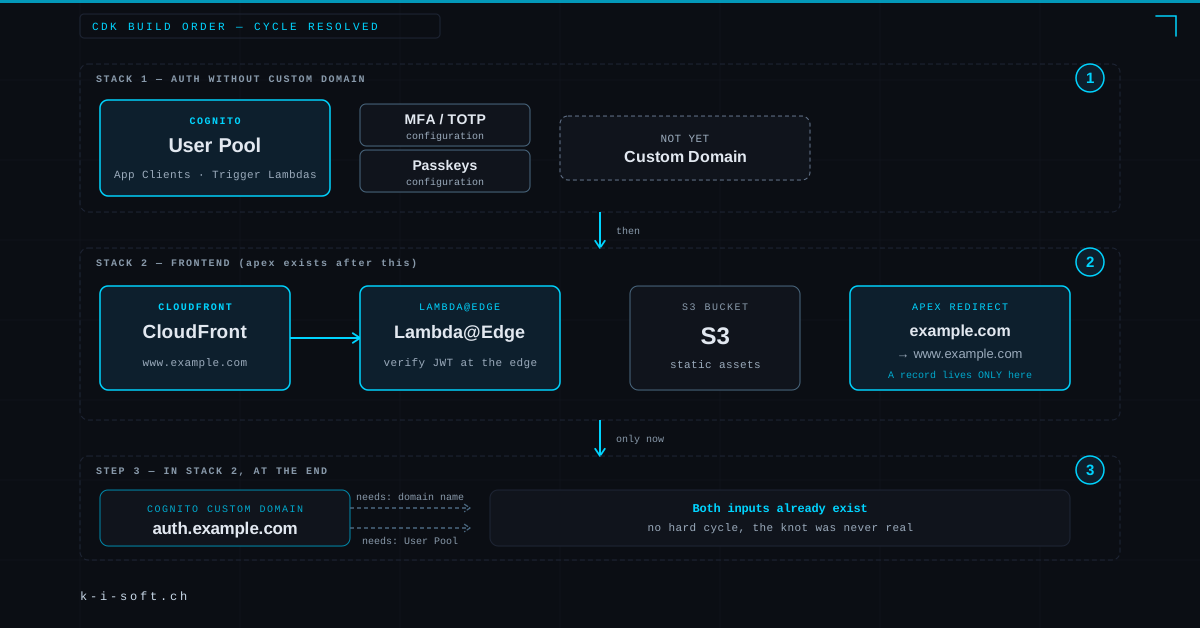
Concretely, in three steps across two CDK stacks:
Stack 1, auth stack without custom domain. User Pool, app clients, MFA configuration, passkey configuration, trigger lambdas, everything Cognito needs to run. What this stack does not have: the custom domain.
Stack 2, frontend stack. S3 bucket, CloudFront distribution, the Lambda@Edge functions, the apex redirect from example.com to www.example.com. After the apply, the apex domain exists and resolves.
Step 3, at the end of Stack 2: the Cognito custom domain. Only now, in the same CDK apply after all other frontend resources, the Cognito custom domain for auth.example.com is created. The only inputs it needs are the domain name and the User Pool. Both already exist at this point.
The order in the CDK apply: Cognito without a domain, then frontend including the apex redirect, then the custom domain as an attachment to the User Pool that already exists. Once the apparent cycle is split at this seam, it stops being a cycle.
07What I take away from this
Three observations from this story.
First, the canonical reference is a starting point, not an end point. The AWS blog from 2018 works, but it no longer hits the 2026 security standard by itself. Anyone building an auth layer today has to close the gap between reference and current state on their own, and should know before the build that the gap exists.
Second, “the service supports X” is a different statement from “the service has a usable end-to-end flow for X”. This distinction holds for every managed-service decision. Before committing to a Hosted UI, take a look at the self-service flows you will end up building yourself.
Third, the hardest infrastructure-as-code traps come from treating two things as indivisible when they can be split at the right seam. Cognito without a custom domain plus the custom domain as a separate step sounds obvious once you see it. Until then, you see a circle.
Anyone sitting with the same trade-offs is welcome to book a call. The auth layer is solid today. Building it was tuition, and this post is the receipt.