01Standard Lambda has a home
And it's often a continent away.
A classic Lambda function runs in exactly one region. Say eu-central-2 in Zurich. When a user in Sydney hits it, the request travels across the Pacific, the function replies, the response travels back. 200 to 400 milliseconds of overhead before your code even starts.
For many workloads that’s fine. For auth checks, security headers, or routing decisions that happen on every request, it’s waste.
02Lambda@Edge flips it
Your code runs where the user is.
Lambda@Edge deploys your function to 400+ CloudFront edge locations worldwide. AWS replicates the code globally, CloudFront runs it at the location closest to the user. 10 to 50 milliseconds instead of 200 to 400, regardless of where the request originates.
You write the function like a normal Lambda (JavaScript or Python). The only differences are where it runs and when it triggers.
03The four trigger points
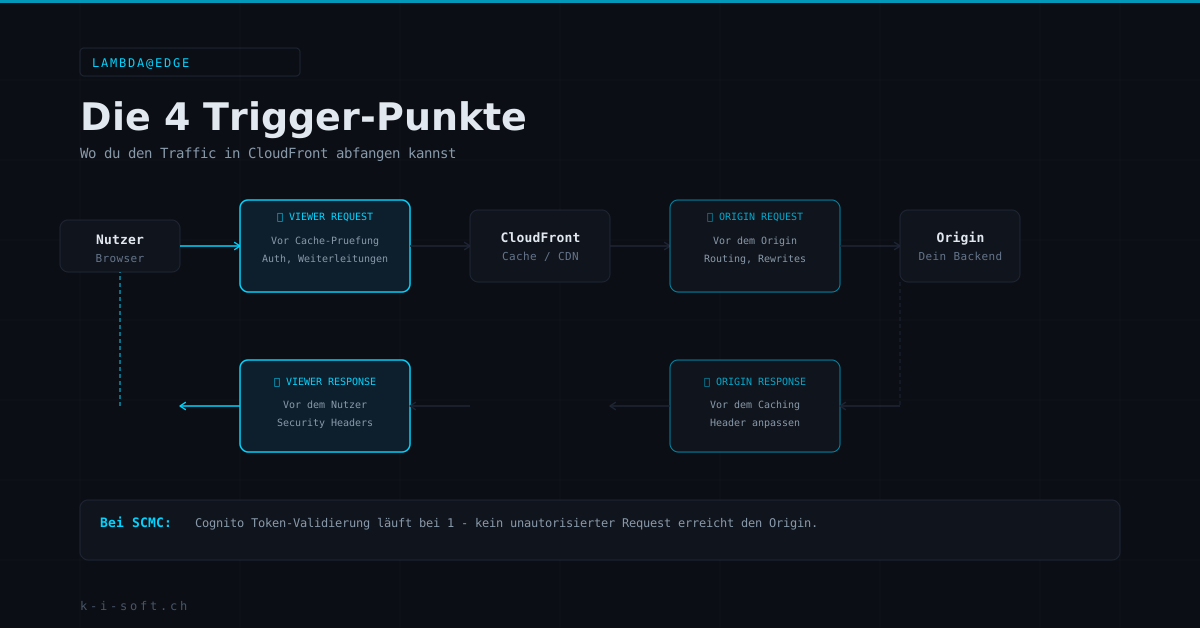
Four moments in the CloudFront request lifecycle where you can intervene.
- Viewer RequestRuns before CloudFront checks the cache. Perfect for auth checks, redirects, URL rewrites, bot detection. If you reject here, the backend never sees it.
- Origin RequestRuns before the request hits the origin (only on cache miss). Good for header manipulation that should not end up in the cache key, and for origin routing.
- Origin ResponseRuns after the origin has replied, before the result is cached. Ideal for response sanitization, adding metadata, reshaping backend errors.
- Viewer ResponseRuns right before the user receives the response. The right place for security headers: CSP, HSTS, X-Frame-Options, Referrer-Policy.
04What you build with it
Edge use cases that actually pay off.
- Edge authentication: Cognito JWTs validated at the edge, invalid tokens never hit the origin
- Central security headers: CSP, HSTS, X-Frame-Options at once for the whole site, no backend changes
- Geolocation routing: CH users to Zurich, EU users to Frankfurt, US users to us-east-1, based on CloudFront country header
- A/B testing at the CDN: 10 % of viewer requests redirected to a different origin, no app-code changes
- URL rewrites and pretty URLs:
/impressumrewritten to/impressum.htmlbefore the origin sees it - Bot and crawler handling: abuse traffic blocked, legitimate crawlers allowed, all at the edge
05The hard limits
What Lambda@Edge is not.
- Viewer triggers: max 128 MB RAM, 5-second timeout, 1 MB package
- Origin triggers: max 10 GB RAM, 30-second timeout, 50 MB package
- No VPC: no access to private RDS, no security groups
- No environment variables: config must come from code or a signed config fetch
- Deployment is global, up to 15 minutes of replication delay per version
- Supported runtimes: Node.js and Python, new versions not always available right away
Lambda@Edge is not a replacement for classic Lambda. It’s for fast checks, header manipulation, and routing. Database calls and heavy compute belong elsewhere.
06In production at SCMC
The full auth flow runs at the edge.
At SCMC.ch, Lambda@Edge validates every protected request on Viewer Request, before CloudFront even checks the cache. JWT verified, claims extracted, request allowed through or rejected with 401. Security headers are added on Viewer Response: CSP, HSTS, X-Frame-Options, Referrer-Policy, once for the entire site.
The result: invalid requests never hit the origin. That saves compute cost, lowers latency for legitimate users, and keeps the backend codebase free of auth boilerplate.