04 // What runs in the background
Your site stays, the attack surface goes
Same content, same appearance. Afterwards your site has no plugin, no database and no admin login left for anyone to attack. CHF 4'500 one-off, then CHF 240 a month including one hour of corrections.
- 4'500CHF fixed price up to 15 pages
- 2-3weeks to the switch-over
- 0plugins, database, admin login
- 240CHF per month, with one hour of corrections
WordPress insecure: what a migration to AWS costs
CHF 4’500 as a fixed price up to 15 pages, two to three weeks. Afterwards the site runs in the Operation package for CHF 240 a month, with hosting including the AWS bill up to CHF 30, security updates and one hour of corrections a month.
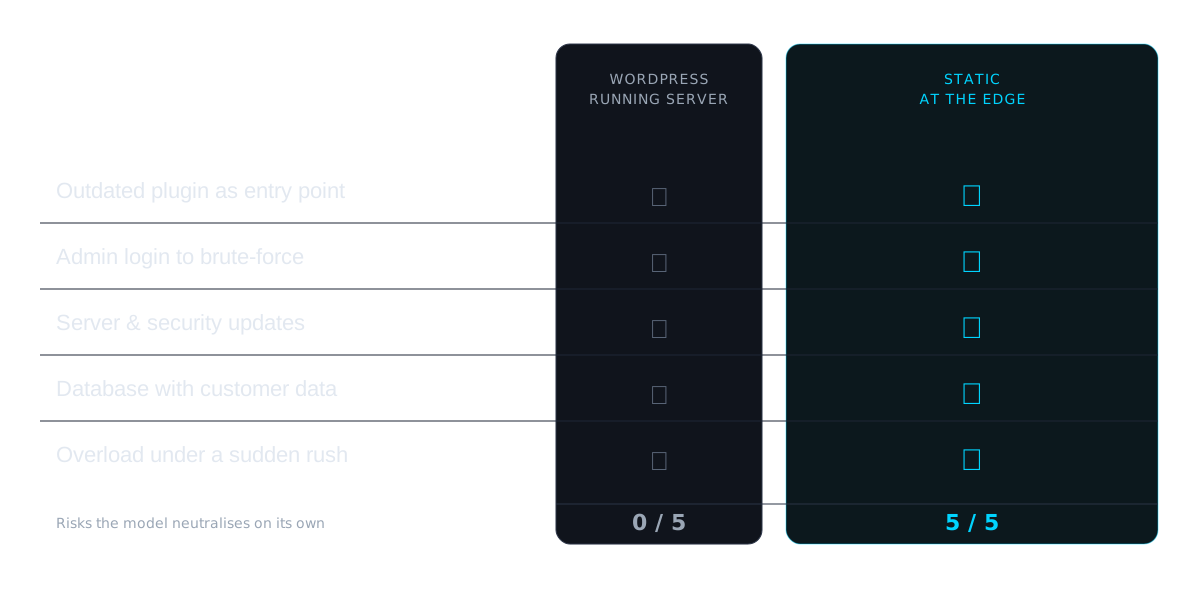
What you get is the same site with the same content and the same appearance. What is missing is everything a WordPress site gets attacked through: plugins, a database and an admin login reachable from the internet.
The difference from a maintenance contract
A maintenance contract for WordPress often costs less in Switzerland than our package, and it has its place. It keeps shut the doors that WordPress brings with it. We rebuild the site so that those doors no longer exist.
| WordPress with a maintenance contract | Served statically, in the Operation package | |
|---|---|---|
| Admin login on the internet | stays and is protected | does not exist |
| Plugins | stay on the server and get updated | do not exist |
| Form submissions | land in the database on the server | go to you by email through a serverless function |
| A new vulnerability becomes known | scanners try it within hours, the update has to be in place first | the delivered site runs no program that could exploit it |
| Updates | run directly on the live site | are built and checked first, only then does the site go live |
Automated scanners try known vulnerabilities within hours of their disclosure. Maintenance can win that race most of the time, but it has to run it again every time. After the migration, the race no longer takes place on your site.
That these scanners hit small sites too is something we measured ourselves: on eleven Swiss sites, 35 percent of all requests came from programs looking for vulnerabilities, see “We are not a target.” What the logs actually say. Why WordPress in particular is so often the target, and what the Swiss Federal Office for Cybersecurity says about it, is in WordPress: what the Swiss authorities warn about, what the numbers show.
What the Operation package includes
CHF 240 per month, for at least three months, cancellable monthly after that.
- Hosting and operation. The site runs in AWS Zurich, and the AWS bill is included in the package up to CHF 30 a month, anything above that we pass on at cost. Publishing, the certificate and backups run, and we notice when the site is unreachable.
- Security of the build. We keep the building blocks the site is built from up to date, security updates first. Every update is built and checked before it goes live. We keep the secure delivery settings current.
- One hour of corrections a month. You send the change by email, we make it. A new text, a replaced image, a changed opening day. The hour does not carry over to the next month, and anything beyond it we bill in units of one hour at CHF 200.
If you cancel the package, we hand the site over into an AWS account of your own free of charge and switch the delivery over. That is done quickly, because the whole site exists as code. After that we help as needed, in units of one hour at CHF 200.
Who this pays off for
The trigger is usually a warning from the provider or a report about a plugin vulnerability. That warning reaches everyone running WordPress, but it does not mean the same thing to everyone.
It pays off when an incident costs you something:
- Customer data runs through the site, meaning a contact form, an upload or a login. For a fiduciary, a law firm or a medical practice, a compromised form holding client data is a different order of magnitude from the cost of the migration. Investigation, restoration and possibly a notification under the revised Swiss data protection act come on top.
- Bookings, orders or appointments come in through it, so an outage costs revenue directly.
- The site is part of a larger system with a portal or a login.
That is why the first question in the call is always the same: what runs through your site?
How the switch-over runs
Two to three weeks, in three steps:
- Inventory. We pull content, structure and appearance out of the existing site and establish which functions are actually needed: forms, search, multiple languages, redirects.
- Build. The site is set up again as a static project, with the same content and the same appearance. All existing URLs are preserved or 301’d, so the search visibility does not break.
- Switch-over. DNS, TLS, redirects and forms are verified. The old site then no longer answers at your address but stays in place as a fallback: cancel your old hosting only once we have signed off the switch-over together.
As a side effect, your content then sits fully in the delivered HTML, readable by AI crawlers from the first request.
The three steps in detail, and where a switchover can cost visitors: Migrating WordPress to AWS.
What we do not do here
We change the build and remove attack surface with it. That is a structural decision, not security consulting.
Risk assessments, protection-requirement analyses, compliance reviews and standards-based measure catalogues are a different discipline and are not part of this offer. If that is what you need, we say so and point you on, rather than delivering it as a side dish.
Why work with us
- You work directly with the senior architect. No account manager handing the work to a junior.
- 30 years of software engineering, plus our own products in operation: SCMC.ch in production since November 2025, Quartiero since July 2026, both in AWS Zurich.
- You are not tied to us. Code and content sit in a GitHub organisation in your name. If you cancel, we move the site into your own AWS account free of charge, and you take it wherever you like.
- We are based in Bern, your data sits in AWS Zurich, FADP- and GDPR-compliant. Fluent German and English, with an understanding of the Swiss business context.
Common questions
What does a migration from WordPress to AWS cost?
CHF 4'500 as a fixed price up to 15 pages, tiered by scope above that. The switch-over takes two to three weeks. Afterwards the site runs in the Operation package for CHF 240 a month, for at least three months and cancellable monthly after that: operation including the AWS bill up to CHF 30, security updates and one hour of corrections a month. Together with the migration that is at least CHF 5'220. A simple site usually needs less than CHF 30 a month at AWS, and anything above that we pass on at cost.
Why not simply a maintenance contract for WordPress?
A maintenance contract keeps the doors of WordPress shut: updating plugins, protecting the admin login, backing up the database. The doors stay where they are, and with every new vulnerability the race between the update and the automated scanners starts again. After the migration your site no longer has those doors. What gets delivered is finished HTML, with no plugin, no database and no login. If a low-cost maintenance contract is enough for you, it is the cheaper option. We offer something different.
What does the Operation package for CHF 240 include?
Hosting in AWS Zurich including the AWS bill up to CHF 30 a month, publishing, the certificate and backups of the site, and we notice when it is unreachable. We keep the building blocks the site is built from up to date, security updates first, and every update is built and checked before it goes live. We keep the secure delivery settings current. On top, one hour of corrections and changes a month, not carried over to the next month. Anything beyond that we bill in units of one hour at CHF 200. The package runs for at least three months and is cancellable monthly after that.
Will the site look different afterwards?
No, and that is the point. Same content, same structure, same appearance. We are not selling a redesign, we are taking away what makes the existing site attackable. We do not build a new look on its own, a web agency is the better choice for that. If the site should also be rebuilt so that search engines and AI systems find you by place and trade, that is our rebuild for CHF 12'000, a separate offer.
Is this worth it for every WordPress site?
No. If the site essentially shows who you are and nothing else runs through it, a maintenance contract or good hosting is the right answer, and we will say so in the first call. It pays off when an incident costs you something: when customer data runs through a form, an upload or a login, when bookings or orders come in through it, or when the site is part of a system with a portal.
Why is WordPress in particular attacked so often?
Because it pays off. WordPress runs on 40.3 percent of all websites (W3Techs, as of 10 September 2026), so an attack that works once works millions of times over, automated. The way in is almost never the core: Patchstack counted 11,334 new vulnerabilities in the WordPress ecosystem in 2025, 91 percent of them in plugins and only six in the core itself. Half of the severe ones are exploited within 24 hours, and for the most heavily targeted the weighted median is five hours. Nobody patches that fast by hand.
Can I still change content afterwards?
Yes. Send us the change by email, the package includes one hour a month for that. If you want to change things yourself, you can: the content sits as text files in a GitHub repository that belongs to you, and every change then goes live automatically. If you publish editorially every day or have several people writing, a static site serves you poorly, and we will tell you so in the first call. Your site no longer has an admin login that anyone can brute-force.
What do I own, and what happens if I cancel?
You own everything. Code and content sit in a GitHub organisation in your name. While the Operation package runs, hosting sits in our AWS account in Zurich and the AWS bill is included in the package up to CHF 30. If you cancel, we hand the site over into an AWS account of your own free of charge and switch the delivery over. That is done quickly, because the site consists of code and nothing is set up by hand. After that we help as needed, in units of one hour at CHF 200.
What happens to our forms and emails?
They stay. A contact form then runs through a serverless function instead of a plugin, and delivery through a mail service in your own AWS environment. Nothing changes for the visitor, but it does for the attack surface: there is no longer a plugin handling the input.
Does more than a business card run through your site?
The free risk check shows in 30 seconds how your site looks from the outside. After that we spend 30 minutes working out whether a migration fits you.